FileCOPA FTP Server - Users

Top  Previous  Next

All logins, including anonymous connections, are defined by 'Users'. Each user can be configured with various privileges and limitations, which can be completely different for each user.

The image below shows the area that deals with users: pressing the Add or Edit buttons gives access to the screen-shots shown further down this page.
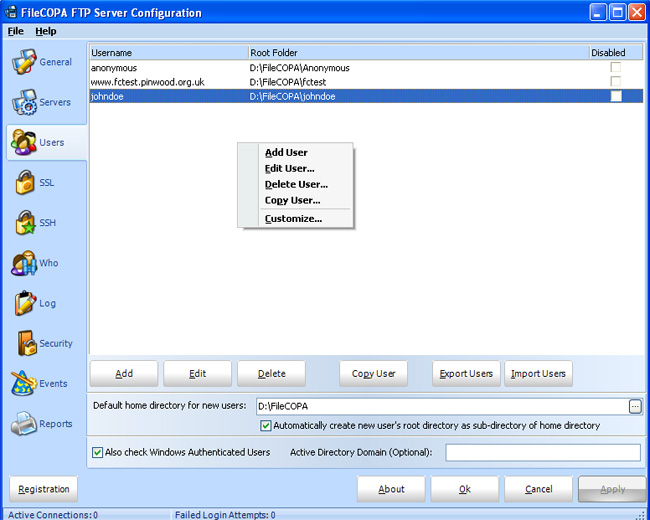
users

General

Here various basic aspects of each user are configured, either for a new user, or for an existing user.

users_general

Limits

Various limitations can be imposed on each user if you wish.

users_limits

Directory Access

Various permissions with regard to files and directories can be imposed here.

NOTE that access configured for a directory is not inherited by sub-directories, which may be configured with their own set of permissions.

users_access

Statistics

Cumulative values will be shown here for this user.

users_stats

Events

Various events can trigger actions (such as playing a sound or sending an email message to warn you of a connection).

Not all events can trigger every type of action because of practical constraints, eg on initial connection before login has been established, as this would break the ftp protocol.

Where an action is configured for a Global Event and a User Event, the action configured for the User Event will override any Global Event.

Events - Send a Message

users_events_message

Events - Send an email message

NOTE that the server specified on the General Tab will be used to send any email messages configured here.

users_events_email


Events - Run an Application (Command)

users_events_command

Events - Play a Sound

users_events_sound

Events - Send a Text File

The text file specified will be sent to the FTP client - NOTE that it may not be seen if a browser is used.

NOTE that this file must be in the root directory of the user's area on your hard disk.

users_events_textfile


FileCOPA FTP Server

© 2004 - 2008 Intervations, Inc.

www.intervations.com